All challenges that you have not yet successfully completed can be found in your Challenge Library under the Retake tab.
There are two types of challenges listed there:
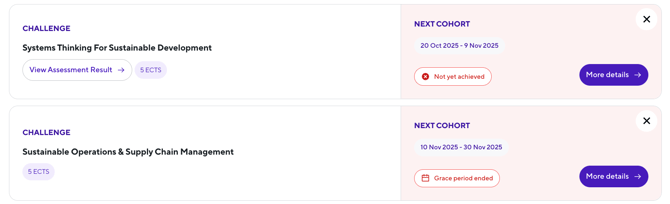
- Not yet achieved: Challenges that you submitted for, but have not achieved yet. You can access your previous assessment results for these challenges by clicking View Assessment Result.
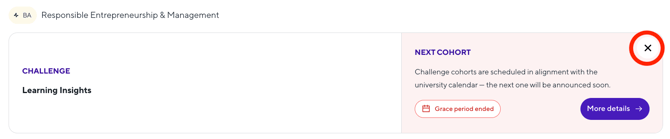
- Grace period ended: Challenges that you started for which the grace period has ended before a submission was made. These can also be challenges that you accidentally signed up for but ended up not taking.
How do I retake a challenge?
You can sign up to retake any challenges you need to directly from your Challenge Library Retake tab.
The only exception are Orientation Phase Challenges.
💡If you need to retake a Challenge in the Orientation Phase, please submit a support ticket to request it. In the ticket let us know you need to be signed up for a Retake of an Orientation Challenge, give us the Challenge name, and the date you want to sign up for.
Why do I have so many challenges to retake?
Don't worry! The new retake tab shows challenges that you started for which the grace period has ended before a submission was made. These can also be challenges that you accidentally signed up for but ended up not taking.
Can I choose not to retake a challenge?
Yes, you can decide whether or not you want to retake a challenge.
If you choose not to retake it, remove the challenge from your retake tab by clicking X in the top right corner of the challenge.
If you are unsure about your program plan and whether to retake a challenge or not, attend office hours to make a plan or reach out to learner support by creating a ticket.